BelloTify BelloTify Changelog

What's New

New features, improvements, and updates from the BelloTify team.

πŸŽ‰ New

🎨 New: Timeline & Magazine Templates for Changelog

Dear Bellotify users,

Your changelog just got a style upgrade. Starting today, you can choose from three beautiful templates to present your updates in a way that matches your brand's personality.

🎨 New Changelog Templates

Beyond the classic default template, you now have two fresh options to tell your product's story:

  • πŸ“… Timeline – A sleek, chronological layout that makes every release feel like a milestone.
  • πŸ“° Magazine – A rich, editorial design perfect for longer notes and visual storytelling.

Switching templates takes one click β€” and your content stays intact. Log in now to try them out πŸš€


Was this helpful?
7 responses
πŸŽ‰ New

πŸ“¬ New: Feedback Widget with Screenshots & Mobile Support

Dear users,

Your product is only as good as the feedback you receive. That's why we’re excited to introduce the Feedback Widget β€” a simple, elegant way for your visitors to share issues, ideas, or questions directly from your website.

πŸ’¬ Instant Feedback, Anytime

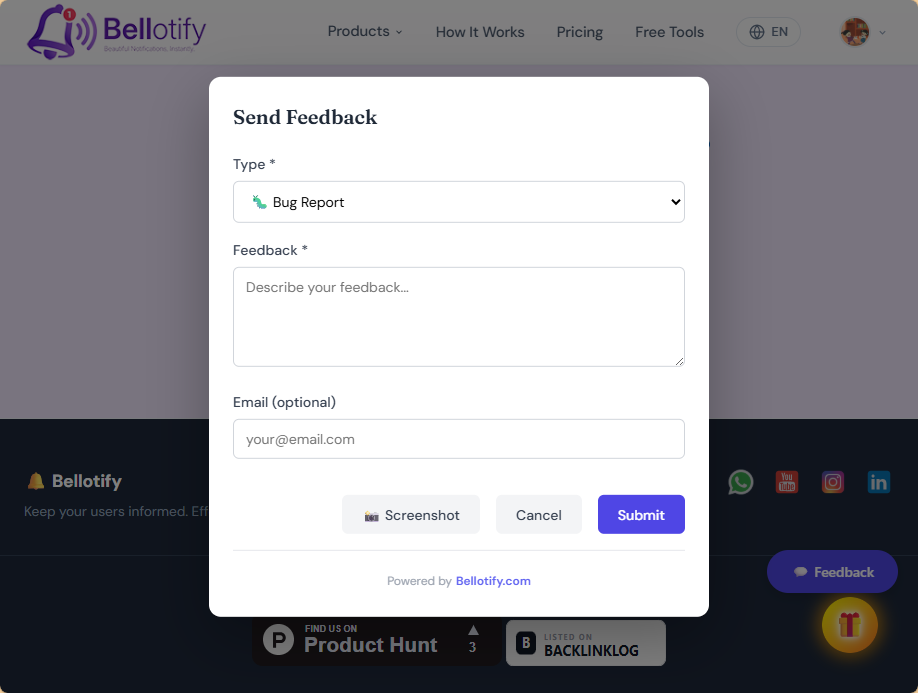
Embed a subtle feedback button anywhere on your site. When a user clicks it, a lightweight form opens β€” no page reload, no friction. They describe their thought, and you get it in your changelog dashboard.

πŸ“Έ Screenshots Made Easy

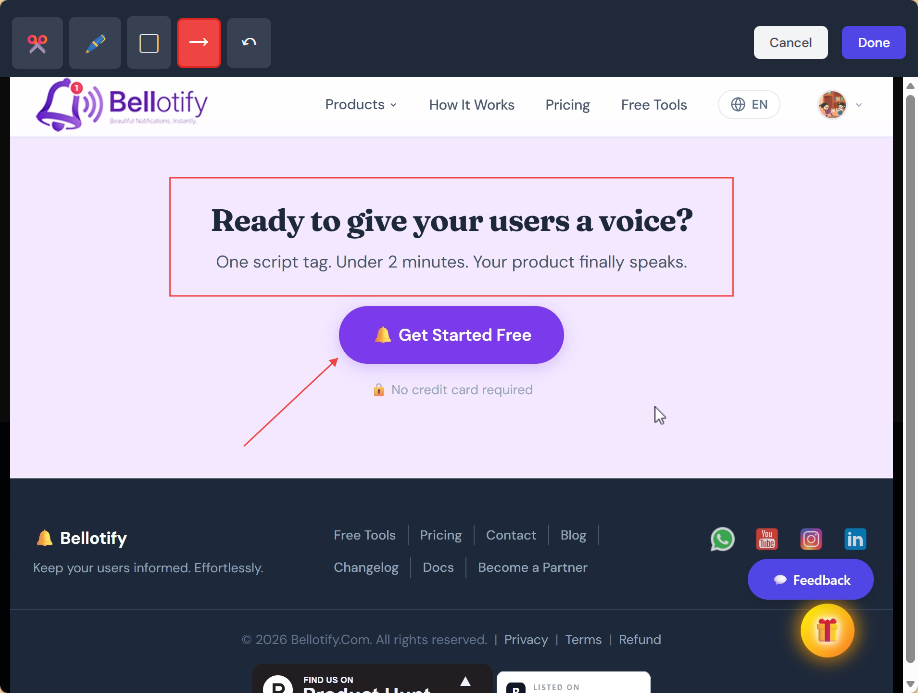
The real game‑changer? Users can attach a screenshot right from their browser β€” perfect for reporting visual bugs or design suggestions. No more confusing descriptions, just a clear picture of what they mean.

πŸ“± Mobile-Ready

Your visitors are on phones too. The widget works flawlessly on mobile devices, so you never miss a valuable comment, whether they’re on desktop or on the go.

Listening to your users has never been this simple. Add the widget to your site today and start collecting feedback that actually helps πŸš€


Was this helpful?
4 responses
πŸŽ‰ New

🎨 Your Dashboard Just Got a Fresh New Look!

Dear users, we’ve been listening carefully to your feedbackβ€”and we knew the dashboard needed a little love. Today, we’re excited to share a complete redesign of the layout and categorization. Everything feels cleaner, more intuitive, and faster to navigate.

🧭 Streamlined Layout

The new layout reduces clutter and puts your most important metrics front and center. You’ll spend less time hunting and more time acting on insights.

πŸ—‚οΈ Smarter Categories

Data is now grouped by context and usage frequency, so related information sits together. Whether you’re a power user or just getting started, you’ll find what you need in half the clicks.

πŸ–±οΈ One-Click Customization

You can now drag and drop widgets to personalize your viewβ€”your dashboard, your way.

Log in now to experience the new dashboardβ€”we think you’ll love it πŸš€


Was this helpful?
9 responses
πŸ”’ Improved

New: Language Switch – Simplified Chinese & Spanish!

Dear [product] users,

We believe great products should feel native to everyone. That's why we're thrilled to announce support for Simplified Chinese and Spanish β€” so you and your global team can use the changelog in the language that feels most natural.

🌐 Two New Languages

You can now switch between English, Simplified Chinese, and Spanish with just one click. Your entire dashboard, including changelogs and settings, will adapt instantly β€” no extra setup required.

Log in now to try it in your preferred language. Β‘Bienvenido! 欒迎! πŸš€


Was this helpful?
4 responses
πŸ”’ Improved

πŸ“Έ New: Browser Mockups, JSON Diff & Webhook Tester

Hey everyone,

We’ve been heads-down building tools that make your day‑to‑day work faster and more delightful. Today we’re shipping three new features β€” from creating beautiful marketing assets in seconds to debugging webhooks like a pro. Let’s dive in!

πŸ–ΌοΈ Browser Mockup Generator

Drop any screenshot, pick a frame and background, and download a polished marketing asset β€” no design skills needed.

πŸ” Smart JSON Diff Checker

Paste two JSON objects and see exactly what’s added, removed, or changed β€” keys are compared semantically, so order doesn’t matter. All comparison runs in your browser β€” your data never leaves your device.

πŸ“‘ Webhook Tester & Request Inspector

Paste your endpoint URL into Stripe, GitHub, Lemon Squeezy, or send requests manually β€” watch everything appear in real time.

Log in now and give them a spin. We think you’ll love them πŸš€


Was this helpful?
5 responses
πŸ”’ Improved

πŸŽ‰ New Free Tools Page: Changelog Generator, Legal Docs & More

Dear Bellotify users,

We're thrilled to introduce a dedicated Free Tools page at bellotify.com/free-tools β€” a growing collection of utilities to simplify your daily tasks. Whether you're wrangling messy commits or drafting legal documents, we've got you covered.

✨ Turn Messy Commits Into Beautiful Changelogs

Paste your commit history and instantly get a clean, structured changelog β€” no more manual formatting.

βš–οΈ Generate Your Legal Documents

Quickly create professional Privacy Policy, Terms of Service, and Refund Policy tailored to your SaaS product.

πŸ”’ SemVer Calculator & Release Planner

Plan your versioning with confidence: calculate semantic versions, map releases, and stay on track.

πŸ—ΊοΈ Product Roadmap Board Simulator

Visualize and simulate your product roadmap to align your team before you build.

All tools are free to use β€” no login required. Head over to the Free Tools page now and give them a try πŸš€


Was this helpful?
6 responses
πŸ”’ Improved

🀝 New: Become a Partner & Admin Upgrades

Dear [product] community,

We're excited to open new doors for collaboration. Today, we're launching the Become a Partner program β€” and giving your admin experience a fresh boost behind the scenes.

🀝 Become a Partner

You can now apply to join our partner program directly from the app. Unlock exclusive benefits, co-marketing opportunities, and early access to new features β€” all designed to help your business grow alongside ours.

πŸ› οΈ Admin Backend Improvements

We've also polished the admin panel under the hood:

  • ⚑ Faster page loads and smoother navigation in the settings area.
  • πŸ”§ New filters and sorting options to manage your data more efficiently.
  • πŸ›‘οΈ Enhanced security checks for sensitive actions β€” your account, your peace of mind.

Log in now to explore the partner program and enjoy a snappier admin experience. We can't wait to see what we'll build together! πŸš€


Was this helpful?
4 responses
πŸ”’ Improved

πŸ” Introducing the Visitors Module – Deep Insights & Segmentation

Dear product community,

Understanding your audience is the heart of building something people love. Today, we're excited to unveil our new Visitors Module β€” a complete toolkit to track, analyze, and engage with every person who lands on your changelog or product page.

πŸ“Š Visitor Analytics & Real-Time Insights

See who's visiting, when, and how often β€” all in real time. No more guessing, just clear data on your audience's behavior.

πŸ‘€ User Profiles & Behavior Tracking

Each visitor gets a rich profile. Follow their journey, understand their actions, and build a complete picture of how they interact with your content.

🎯 Audience Segmentation

Slice your visitors into meaningful groups β€” by behavior, source, or engagement level. Then tailor your messaging like never before.

πŸ’¬ Feedback Sentiment & Content Health

Gauge how people feel about your updates. Track satisfaction scores, sentiment trends, and the overall health of your changelog β€” all in one place.

πŸ”₯ Peak Activity Heatmap & Keyword Trends

Discover when your audience is most active and what topics grab their attention. Use these smart insights to optimize timing and content strategy.

Your changelog just became a two-way conversation. Log in now to explore your first visitor report πŸš€


Was this helpful?
5 responses
πŸ”’ Improved

πŸ”” New: Custom Bell Icon – Personalize Your Notifications!

Dear Bellotify users,

Your brand deserves to shine everywhere β€” even in the little things. We're excited to let you swap the default bell icon for your own custom image. Make your notification center truly yours.

πŸ”” Custom Bell Icon

Now you can upload any PNG or WEBP image (size: 32Γ—32 to 128Γ—128 px, max 50 KB) to replace the standard bell. Whether it's your logo or a fun design, it'll show up wherever your bell does.

Head to Settings β†’ Notifications to upload your custom icon today. 🎨


Was this helpful?
2 responses
πŸ”’ Improved

🎨 Custom CSS & JS Injection – Personalize Your Public Changelog

Dear users,

Your changelog should feel like an extension of your brand β€” not a generic page. That's why we're thrilled to introduce the ability to inject custom CSS and JavaScript tracking scripts directly into your public changelog. Design every pixel and connect the tools you love.

🎨 Custom Styling, Your Way

Drop in your own CSS to match your brand's colors, fonts, and layout perfectly. No more compromises β€” your changelog now looks exactly how you want it.

πŸ“Š Smart Tracking & Integrations

Add any JavaScript snippet β€” analytics, heatmaps, or custom scripts β€” to understand how your audience interacts with your updates. Measure engagement without leaving our platform.

βœ… Your Code, Your Rules

Everything runs in a sandboxed environment, so your customizations are safe and performant. No worries about breaking the page.

Go ahead β€” give your changelog a personal touch. Log in and try the new customization options now πŸš€


Was this helpful?
2 responses